Ok, I'll admit it, I love a good suggestive joke from time to time. I do hold back on what I post, but frankly, I've seen much worse on TV on any given night.
I'm just left with this mental picture of dear Sister Stanislaus doing this and ... It broke my fragile little mind.
So, thanks Kevin and for the rest of us ... enjoy...
A NICE CATHOLIC JOKE
Two nuns are ordered to paint a room in the convent, with a warning from the Mother Superior not to get even a drop of paint on their habits.
After conferring about this, the two nuns decide to lock the door of the room, strip off their habits, and paint naked...
In the middle of the project, there's a knock at the door.
"Who is it?" calls one of the nuns.
"Blind man," replies a voice from the other side of the door.
The two nuns look at each other and shrug, both deciding that no harm can come from letting a blind man into the room. They open the door.
"Nice boobs," says the man. "Where do you want the blinds?"

An Open Letter To My Sister, or Whatever Pops Into My Head at the Time...
Saturday, October 13, 2012


Friday, October 12, 2012
Firefox 16 All Clear But That's The Internet For You
They announced today that yesterday's big scare, the Security Hole in Firefox 16.0.0 has been fixed.
That really doesn't change a whole lot.
Sure, you should update if you're already using Firefox 16.0.0, and it means that that hole has been plugged. What it doesn't change is that machine you are using to look at what I have written has more security holes than that and the fix someone puts in for one piece of software may break something else in that software.
Like they said in Hill Street Blues all those years ago "Lets be careful out there".
For every hole they plug, someone will find another.
The best fix for something like that is to simply step back and choose your poison.
(Boy am I full of old hackneyed sayings today!)
The latest and greatest cutting edge software isn't always the best. Sometimes it works, and sometimes you are reading some fool on a blog telling you to roll back what you did and wait like I did yesterday.
Thing is that you never really know what will happen and when you get a good update or not.
I tend to be very late on some software. Adobe PDF and Flash, Java both are terrible. They are constantly nagging me to update. When they do, they demand that I stop what I am doing, close my browser or even restart the computer for what we call "Application Software". This isn't some major component in the computer, this is a stupid PDF reader.
Write your update programs better.
When you are like me and open upwards of 150 web pages before even getting started, having to upgrade your PDF reader and start over again just isn't really going to happen the way they want it to.
So what I did is I tell all these annoying little pieces of software that I need to do my thing to check and tell me what's out there but let me decide when to upgrade.
I'm not having an enforced coffee break because some fool in a software development team misspelled a word on a screen somewhere.
The reality is that we're all flying blind and hoping for the best. You can either be annoyed at having to update a couple programs a couple times a day, or you can push it all off and have the illusion that you're controlling your destiny.
Honestly, I just don't know which is best.
That really doesn't change a whole lot.
Sure, you should update if you're already using Firefox 16.0.0, and it means that that hole has been plugged. What it doesn't change is that machine you are using to look at what I have written has more security holes than that and the fix someone puts in for one piece of software may break something else in that software.
Like they said in Hill Street Blues all those years ago "Lets be careful out there".
For every hole they plug, someone will find another.
The best fix for something like that is to simply step back and choose your poison.
(Boy am I full of old hackneyed sayings today!)
The latest and greatest cutting edge software isn't always the best. Sometimes it works, and sometimes you are reading some fool on a blog telling you to roll back what you did and wait like I did yesterday.
Thing is that you never really know what will happen and when you get a good update or not.
I tend to be very late on some software. Adobe PDF and Flash, Java both are terrible. They are constantly nagging me to update. When they do, they demand that I stop what I am doing, close my browser or even restart the computer for what we call "Application Software". This isn't some major component in the computer, this is a stupid PDF reader.
Write your update programs better.
When you are like me and open upwards of 150 web pages before even getting started, having to upgrade your PDF reader and start over again just isn't really going to happen the way they want it to.
So what I did is I tell all these annoying little pieces of software that I need to do my thing to check and tell me what's out there but let me decide when to upgrade.
I'm not having an enforced coffee break because some fool in a software development team misspelled a word on a screen somewhere.
The reality is that we're all flying blind and hoping for the best. You can either be annoyed at having to update a couple programs a couple times a day, or you can push it all off and have the illusion that you're controlling your destiny.
Honestly, I just don't know which is best.
Thursday, October 11, 2012
Consider Downgrade on Firefox 16.0
There was one of those exploits that you hear about found on Firefox 16.0 the other day. As a result, the recommendation is that if you have Firefox 16.0 to downgrade to version 15.0.1 and wait for a fix.
You can check your version by doing the following:
Start Firefox
Click Help
Click About Firefox
If you have version 15.0.1 you're safe.
If you have version 16.0, you will want to downgrade to 15.0.1
The good news is that they're working on a fix and supposedly will have one out by today, October 12th, 2012... but you never know.
For more information, you can read up on the problem here, or look into their Security Blog here.
What the bug does is it allows an evil doer to see what you have done since you started the browser. So if you plan on waiting it out, don't hit the banks.
That's what happens when you rush software out the door.
You can check your version by doing the following:
Start Firefox
Click Help
Click About Firefox
If you have version 15.0.1 you're safe.
If you have version 16.0, you will want to downgrade to 15.0.1
The good news is that they're working on a fix and supposedly will have one out by today, October 12th, 2012... but you never know.
For more information, you can read up on the problem here, or look into their Security Blog here.
What the bug does is it allows an evil doer to see what you have done since you started the browser. So if you plan on waiting it out, don't hit the banks.
That's what happens when you rush software out the door.
Wednesday, October 10, 2012
The Sun Visits
I was out having lunch with a friend who I see maybe once a year. After a very full meal of Chinese Food and some great conversation, I arrived at the doorstep.
That was when it started. The Sun arrived in a little brown box brought by a truck.
Since the box wasn't for me, I set it on the chair and went about my business.
Later after trying to convince the dog that there were better things than starving herself, and yes, the LettieBurger (TM) was indeed good food, the story began to unfold.
"So, what's in the box?"
"Oh that's the new lights for the bathroom!"
"Really, I had forgotten..."
"Yes, they're Dimmable Fluorescents!"
"Ok, we can deal with that later, lets get Mrs Dog and you ready for the walk around the block"
You see Dimmable Fluorescent! look just like every other compact fluorescent light bulb. They all have that chunky base. A teeny bit of Mercury in them that make some people treat them like toxic waste. A whitish helix of glass above the base that emits light. Connect them up to a normal light socket and they work just like any other. Light goes on, Light goes off. Don't get them too cold because they don't like that.
There was a commotion in the bathroom that night as things got hooked up "properly".
"Oh my god this is going to be bright"
I padded into the hallway seeing things I hadn't seen before.
"Is that an ant or do we need to have the house sprayed for pests?"
"Huh? Which ant?"
"I'll get the tape so we can catch it and look under a magnifying glass..."
It was an ant, we can deal with that.
Then I realized why I could see the ant crawling through the short hallway.
"You're right, its going to be bright, and that is a good thing!"
One of the old school incandescent light bulbs was replaced by one of those ugly chunky fluorescent helixes and a smiling face was looking up at it as if to get a suntan.
The light from that one bulb was so much brighter at 26 watts that the walls had begun to change color. The detail was being washed out of the wall behind the bulb and things were taking on a weird post-nuclear-blast look to it.
I went out to put back the magnifying glass saying "Ok, that's outrageous".
On returning, there was one oven mitt on his one hand, a fluorescent bulb in the other. "We're going to have a little fun here".
It's not often you see someone coming at you in the bathroom with an oven mitt and a light bulb, and usually it's for creative purposes when they do.
"So you're going to replace them now?" Thinking the dog walk is going to be delayed... "There's a cell approaching on Radar, I want to get a long walk in and empty her out for the night!"
Being told not to worry, I leashed up Mrs Dog and grabbed the dog bags. She led the way out of the little laundry to the front door when I saw it out of the corner of my eye.
If you ever had the pleasure of seeing the movie Saving Grace, there is a scene where the men were standing outside of a little pub in a small seaside village in Britain. It is night. Someone turns to see the large house on the crest of the hill just outside of town light up as if it were being turned into a landing site for extraterrestrial space craft.
This was my bathroom.
"Don't you think this is a bit much?"
"I'll adjust the dimmer tonight."
"Not if you dim this down you don't"
"Don't worry, it will just make it so the dark end of the dimmer doesn't flicker."
"Ahh, great! I'm thinking all this light will make working in the bathroom much easier!"
Yes, I now have the brightest bathroom on the block. I may actually have the brightest bathroom on the island. 104 Watts of Compact Fluorescent after image inducing brilliance is an awful lot in a small room. It brings out some amazing detail. Since it's a bathroom... well I've got my work cut out for me.
"Hey, do you think we can keep this thing dim for guests? I've got to clean this place!"
That's just one of the small drawbacks. I guess it really is possible to have too much of a good thing.

That was when it started. The Sun arrived in a little brown box brought by a truck.
Since the box wasn't for me, I set it on the chair and went about my business.
Later after trying to convince the dog that there were better things than starving herself, and yes, the LettieBurger (TM) was indeed good food, the story began to unfold.
"So, what's in the box?"
"Oh that's the new lights for the bathroom!"
"Really, I had forgotten..."
"Yes, they're Dimmable Fluorescents!"
"Ok, we can deal with that later, lets get Mrs Dog and you ready for the walk around the block"
You see Dimmable Fluorescent! look just like every other compact fluorescent light bulb. They all have that chunky base. A teeny bit of Mercury in them that make some people treat them like toxic waste. A whitish helix of glass above the base that emits light. Connect them up to a normal light socket and they work just like any other. Light goes on, Light goes off. Don't get them too cold because they don't like that.
There was a commotion in the bathroom that night as things got hooked up "properly".
"Oh my god this is going to be bright"
I padded into the hallway seeing things I hadn't seen before.
"Is that an ant or do we need to have the house sprayed for pests?"
"Huh? Which ant?"
"I'll get the tape so we can catch it and look under a magnifying glass..."
It was an ant, we can deal with that.
Then I realized why I could see the ant crawling through the short hallway.
"You're right, its going to be bright, and that is a good thing!"
One of the old school incandescent light bulbs was replaced by one of those ugly chunky fluorescent helixes and a smiling face was looking up at it as if to get a suntan.
The light from that one bulb was so much brighter at 26 watts that the walls had begun to change color. The detail was being washed out of the wall behind the bulb and things were taking on a weird post-nuclear-blast look to it.
I went out to put back the magnifying glass saying "Ok, that's outrageous".
On returning, there was one oven mitt on his one hand, a fluorescent bulb in the other. "We're going to have a little fun here".
It's not often you see someone coming at you in the bathroom with an oven mitt and a light bulb, and usually it's for creative purposes when they do.
"So you're going to replace them now?" Thinking the dog walk is going to be delayed... "There's a cell approaching on Radar, I want to get a long walk in and empty her out for the night!"
Being told not to worry, I leashed up Mrs Dog and grabbed the dog bags. She led the way out of the little laundry to the front door when I saw it out of the corner of my eye.
If you ever had the pleasure of seeing the movie Saving Grace, there is a scene where the men were standing outside of a little pub in a small seaside village in Britain. It is night. Someone turns to see the large house on the crest of the hill just outside of town light up as if it were being turned into a landing site for extraterrestrial space craft.
This was my bathroom.
"Don't you think this is a bit much?"
"I'll adjust the dimmer tonight."
"Not if you dim this down you don't"
"Don't worry, it will just make it so the dark end of the dimmer doesn't flicker."
"Ahh, great! I'm thinking all this light will make working in the bathroom much easier!"
Yes, I now have the brightest bathroom on the block. I may actually have the brightest bathroom on the island. 104 Watts of Compact Fluorescent after image inducing brilliance is an awful lot in a small room. It brings out some amazing detail. Since it's a bathroom... well I've got my work cut out for me.
"Hey, do you think we can keep this thing dim for guests? I've got to clean this place!"
That's just one of the small drawbacks. I guess it really is possible to have too much of a good thing.

Tuesday, October 9, 2012
Removing Smooth Scroll and other Tweaks in Windows 7
After setting up my computer with Windows 7 I noticed that there were a few basic things that I'd qualify as being "Annoyances" that really are "eye candy". The biggest one for me is something called "Smooth Scroll".
Smooth scroll in Windows is where you're looking at a document and hit a Page Down or Page Up key. What happens is that instead of it snapping to the next page, it scrolls down smoothly in something that looks like you're reading something on a roll of paper that someone is pulling away or towards you.
In my case, it just seems unnatural and slightly nausea inducing. Seeing that one of my favorite things in life is a Rollercoaster, I'm not saying this lightly.
Here's how I set the computer up to get rid of Smooth Scroll plus a few video tweaks. I hadn't turned all the eye candy off. As you can see in the picture, I still have Aero Glass turned on. I'll leave eye candy on when it serves a purpose, and the effect seems to work for me.
Your screen should look like the picture below.

You can take my word for it, if you select things like in that list, you'll be on your way, but I will explain specifically what you want to do here.
But there is more...
If you do a lot in Explorer, you will notice that they are still trying to convince you that Microsoft's Smooth Scroll algorithm works. It does not work well, especially with a long list of files in a folder. To turn that one off, do the following:
Finally if you want to stop Smooth Scroll in Firefox:
Smooth scroll in Windows is where you're looking at a document and hit a Page Down or Page Up key. What happens is that instead of it snapping to the next page, it scrolls down smoothly in something that looks like you're reading something on a roll of paper that someone is pulling away or towards you.
In my case, it just seems unnatural and slightly nausea inducing. Seeing that one of my favorite things in life is a Rollercoaster, I'm not saying this lightly.
Here's how I set the computer up to get rid of Smooth Scroll plus a few video tweaks. I hadn't turned all the eye candy off. As you can see in the picture, I still have Aero Glass turned on. I'll leave eye candy on when it serves a purpose, and the effect seems to work for me.
- Click Start and select Control Panel.
- I suggest you select "View By: Large Icons". Makes life easier to find things when they're not stuck together in categories. Besides, that's how I find things.
- Select System.
- Select "Advanced System Settings". This is on the list at the upper left. You will see a pop up telling you if you really want to do this, you need to be an Administrator. You do.
- Under the System Properties, select the Advanced tab.
- Under Performance, Click on the Settings button.
Your screen should look like the picture below.

You can take my word for it, if you select things like in that list, you'll be on your way, but I will explain specifically what you want to do here.
- The first three check boxes are to turn off animations in windows. I find them unnecessary and not having them will make your machine seem faster.
- The second three check boxes are to turn on Aero Glass and Aero Peek. I like them, you may not.
- The next five buttons I turned off. The fade effect irks me because it feels like it's slowing the computer down just to get things done. Task bar effects I personally never found useful and the shadow under the mouse pointer has been shown to slow down your video card.
- Shadows Under Windows helps me to tell where one window starts and ends, but at a performance hit on the video.
- Thumbnails instead of Icons, will search a folder and try to present you with what the item actually is, but it is a performance hit when you open a large folder. Your choice.
- Translucent Selection Rectangle is a help when you do a lot of cut and paste, as I do.
- Show Window Contents While Dragging is one of those things that I keep on because the alternative is to just show a selection rectangle while you're moving windows. Your choice.
- Slide Open Combo Boxes is another one of those things I don't see the point of, you may. It feels like it slows down the computer to me.
- Smooth edges of Screen Fonts is important if you do a lot of word processing and composition like I do. I personally prefer it.
- Smooth Scroll List boxes. Evil. Turn it off. This was the one I got started going through my preferences with in the first place.
But there is more...
If you do a lot in Explorer, you will notice that they are still trying to convince you that Microsoft's Smooth Scroll algorithm works. It does not work well, especially with a long list of files in a folder. To turn that one off, do the following:
- Click Start, then Control Panel
- Click Internet Options, then the Advanced Tab.
- In the long list, find the Browsing group, then "Use Smooth Scrolling". Turn that box off, then select Apply and OK.
Finally if you want to stop Smooth Scroll in Firefox:
- Select Tools
- Select Options
- Select the Advanced Tab
- Select the General Tab
- Uncheck the "Use smooth scrolling" check box.
- Click OK and you're done.
Monday, October 8, 2012
A Frog, A Parrot, and A Thunderstorm
It had been a wet October. Storms would come in off the ocean, stay for a while, and then move on their way lazily up the coast.
Sometimes they'd stay all day. Others would arrive late at night like a drunk falling in from a bar, loudly proclaiming their presence with a noise that would wake you from your slumber.
This day was more of the lazy day.
Standing in front of the kitchen window, stirring the coffee and absentmindedly munching on some toffee peanuts that I didn't need from a discount store, I spotted the little dark colored frog migrating Eastward toward his new home.
There was so much rain falling from the roof that it's home got flooded.
In the background there was music playing. A bad tribute to Empire Strikes Back on the air, Darth Vader's memories being evoked in time with the snack and the hopping.
Dum Dum Da-Dum (Munch, Hop!) Da DA Dum Da DA Dum (Munch, Hop!).
It was a good solid rain bringing a white noise to the concert.
DA DA DA Dum (Hop!) Da Dum Da Da Dum (Crunch).
Hearing the flapping in the Florida room, someone was begging for attention. Oscar, the Orange Wing had decided that he wanted to enjoy this storm too.
(Crunch) Oscar, Want a Shower?!?!
HELLO! (Flapflapflap) URP!
OK, Shower!
(Munch) Urp!
I set the cage on the floor, slid open the door to the back yard and set him on the deck.
Deciding that I really didn't need any more of those sweet and salty snacks, I went back to tending to the coffee. My old friend was out there doing acrobatics inside his home trying to catch every errant drop in a flutter of Green and Grey, Orange and Black. Feathers spread open and wings splayed to the last inch, he was in his glory.
(Hop Hop JUMP!) Oscar was being watched. The frog had decided that this was all too much and leapt for safety under the bougainvillea at the edge of the property. The Wildlife was having a pleasant morning.

Sometimes they'd stay all day. Others would arrive late at night like a drunk falling in from a bar, loudly proclaiming their presence with a noise that would wake you from your slumber.
This day was more of the lazy day.
Standing in front of the kitchen window, stirring the coffee and absentmindedly munching on some toffee peanuts that I didn't need from a discount store, I spotted the little dark colored frog migrating Eastward toward his new home.
There was so much rain falling from the roof that it's home got flooded.
In the background there was music playing. A bad tribute to Empire Strikes Back on the air, Darth Vader's memories being evoked in time with the snack and the hopping.
Dum Dum Da-Dum (Munch, Hop!) Da DA Dum Da DA Dum (Munch, Hop!).
It was a good solid rain bringing a white noise to the concert.
DA DA DA Dum (Hop!) Da Dum Da Da Dum (Crunch).
Hearing the flapping in the Florida room, someone was begging for attention. Oscar, the Orange Wing had decided that he wanted to enjoy this storm too.
(Crunch) Oscar, Want a Shower?!?!
HELLO! (Flapflapflap) URP!
OK, Shower!
(Munch) Urp!
I set the cage on the floor, slid open the door to the back yard and set him on the deck.
Deciding that I really didn't need any more of those sweet and salty snacks, I went back to tending to the coffee. My old friend was out there doing acrobatics inside his home trying to catch every errant drop in a flutter of Green and Grey, Orange and Black. Feathers spread open and wings splayed to the last inch, he was in his glory.
(Hop Hop JUMP!) Oscar was being watched. The frog had decided that this was all too much and leapt for safety under the bougainvillea at the edge of the property. The Wildlife was having a pleasant morning.

Sunday, October 7, 2012
Healthy Heart Hints

Thanks to Velma go for this list of healthy hints.
Ok, doctors, is this true?
Because I Care for you...
Dr.Devi Shetty, Hrudayalaya
(Heart Specialist) Bangalore
A chat with Dr..Devi Shetty, Narayana Hrudayalaya(Heart Specialist) Bangalore was arranged by WIPRO for its employees The transcript of the chat is given below.
It is useful for everyone.
Q: What are the thumb rules for a layman to take care of his heart?
Ans:
1. Diet - Less of carbohydrate, more of protein, less oil
2. Exercise - Half an hour's walk, at least five days a week; avoid lifts and avoid sitting for a longtime
3. Quit smoking
4. Control weight
5. Control blood pressure and sugar
Q: Is eating fish good for the heart ?
Ans: Yes
Q: It's still a grave shock to hear that some apparently healthy person
gets a cardiac arrest. How do we understand it in perspective?
Ans: This is called silent attack; that is why we recommend everyone past the age of 30 to undergo routine health checkups.
Q: Are heart diseases hereditary?
Ans: Yes
Q: What are the ways in which the heart is stressed? What practices do you suggest to de-stress?
Ans: Change your attitude towards life. Do not look for perfection in everything in life.
Q: Is walking better than jogging or is more intensive exercise required to keep a healthy heart?
Ans: Walking is better than jogging since jogging leads to early fatigue and injury to joints
Q: You have done so much for the poor and needy. What has inspired you to do so?
Ans: Mother Theresa , who was my patient..
Q: Can people with low blood pressure suffer heart diseases?
Ans: Extremely rare.
Q: Does cholesterol accumulates right from an early age
(I'm currently only 22) or do you have to worry about it only after you are above 30 years of age?
Ans: Cholesterol accumulates from childhood.
Q: How do irregular eating habits affect the heart ?
Ans: You tend to eat junk food when the habits are irregular and your body's enzyme release for digestion gets confused.
Q: How can I control cholesterol content without using medicines?
Ans: Control diet, walk and eat walnut.
Q: Which is the best and worst food for the heart?
Ans: Fruits and vegetables are the best and the worst is oil.
Q: Which oil is better - groundnut, sunflower, olive?
Ans: All oils are bad .
Q: What is the routine checkup one should go through? Is there any specific test?
Ans: Routine blood test to ensure sugar, cholesterol is ok. Check BP, Treadmill test after an echo.
Q: What are the first aid steps to be taken on a heart attack?
Ans: Help the person into a sleeping position , place an aspirin tablet under the tongue with a sorbitrate tablet if available, and rush him to a coronary care unit since the maximum casualty takes place within the first hour..
Q: How do you differentiate between pain caused by a heart attack and that caused due to gastric trouble?
Ans: Extremely difficult without ECG.
Q: What is the main cause of a steep increase in heart problems amongst youngsters? I see people of about 30-40 yrs of age having heart attacks and serious heart problems.
Ans: Increased awareness has increased incidents. Also, sedentary lifestyles, smoking, junk food, lack of exercise in a country where people are genetically three times more vulnerable for heart attacks than Europeans and Americans.
Q: Is it possible for a person to have BP outside the normal range of 120/80 and yet be perfectly healthy?
Ans: Yes.
Q: Marriages within close relatives can lead to heart problems for the child. Is it true?
Ans : Yes, co-sanguinity leads to congenital abnormalities and you may not have a software engineer as a child
Q: Many of us have an irregular daily routine and many a times we have to stay late nights in office. Does this affect our heart ? What precautions would you recommend?
Ans : When you are young, nature protects you against all these irregularities. However, as you grow older, respect the biological clock.
Q: Will taking anti-hypertensive drugs cause some other complications (short / long term)?
Ans : Yes, most drugs have some side effects. However, modern anti-hypertensive drugs are extremely safe.
Q: Will consuming more coffee/tea lead to heart attacks?
Ans : No.
Q: Are asthma patients more prone to heart disease?
Ans : No.
Q: How would you define junk food?
Ans : Fried food like Kentucky , McDonalds , samosas, and even masala dosas.
Q: You mentioned that Indians are three times more vulnerable. What is the reason for this, as Europeans and Americans also eat a lot of junk food?
Ans: Every race is vulnerable to some disease and unfortunately, Indians are vulnerable for the most expensive disease.
Q: Does consuming bananas help reduce hypertension?
Ans : No.
Q: Can a person help himself during a heart attack (Because we see a lot of forwarded emails on this)?
Ans : Yes. Lie down comfortably and put an aspirin tablet of any description under the tongue and ask someone to take you to the nearest coronary care unit without any delay and do not wait for the ambulance since most of the time, the ambulance does not turn up.
Q: Do, in any way, low white blood cells and low hemoglobin count lead to heart problems?
Ans : No. But it is ideal to have normal hemoglobin level to increase your exercise capacity.
Q: Sometimes, due to the hectic schedule we are not able to exercise. So, does walking while doing daily chores at home or climbing the stairs in the house, work as a substitute for exercise?
Ans : Certainly. Avoid sitting continuously for more than half an hour and even the act of getting out of the chair and going to another chair and sitting helps a lot.
Q: Is there a relation between heart problems and blood sugar?
Ans: Yes. A strong relationship since diabetics are more vulnerable to heart attacks than non-diabetics.
Qn: What are the things one needs to take care of after a heart operation?
Ans : Diet, exercise, drugs on time , Control cho lesterol, BP, weight.
Q: Are people working on night shifts more vulnerable to heart disease when compared to day shift workers?
Ans : No.
Q: What are the modern anti-hypertensive drugs?
Ans : There are hundreds of drugs and your doctor will chose the right combination for your problem, but my suggestion is to avoid the drugs and go for natural ways of controlling blood pressure by walk, diet to
reduce weight and changing attitudes towards lifestyles.
Q: Does dispirin or similar headache pills increase the risk of heart attacks?
Ans : No.
Q: Why is the rate of heart attacks more in men than in women?
Ans : Nature protects women till the age of 45. (Present Global census show that the Percentage of heart disease in women has increased than in men )
Qn: How can one keep the heart in a good condition?
Ans : Eat a healthy diet, avoid junk food, exercise everyday, do not smoke and, go for health checkup s if you are past the age of 30 ( once in six months recommended) ....
JUST TO REMIND YOU TO BE MORE CAREFUL
Answer the phone by LEFT ear
Do not drink coffee TWICE a day
Do not take pills with COOL water
Do not have HUGE meals after 5pm
Reduce the amount of TEA you consume
Reduce the amount of OILY food you consume
Drink more WATER in the morning, less at night
Keep your distance from hand phone CHARGERS
Do not use headphones/earphone for LONG period of time
Best sleeping time is from 10pm at night to 5am in the morning
Do not lie down immediately after taking medicine before sleeping
When cell strength is down to the LAST grid/bar, do not answer the phone as the radiation is 1000 times
Saturday, October 6, 2012
Goodbye Anabelle

I met her shortly after she adopted Larry and Kathie. She was wandering around a parking lot as a stray in West Palm Beach and made it known to Larry and Kathie that she was willing to be found.
They adopted her and made an effort to find the prior owner, but that never really happened. It was clear that she had had a rough life before then and she had a much better life in store.
One of my trips down as a snowbird, she decided that she was going to meet me. I visited them at their house and sat on the couch after being sniffed, wiggled at, licked and generally had attention demanded of. I practiced the "No Touch, No Talk, No Eye Contact" mantra as long as I could, and finally gave in to some good natured doggie fun. From that point on, we made friends. In fact, Kathie had told me more than once that she treats me in a very different way than she does anyone else. I guess I really am a Dog Person.
Yes, this was a pit bull. In fact she was a great ambassador for the breed, and taught me I needed to relax around them and read the owner first. She was so sweet a dog that every time she saw me, she wanted to come with me when I went. I guess she liked the excitement of the possibility of a ride in the Jeep that vaguely smelled like my own dog Lettie.
It is now at least 10 years later. She's got a football sized tumor on her liver that had sucked the life out of her and left her looking thin. They're at the point where keeping her going is just prolonging the pain. I know that the next visit, I'll be looking down on the couch and have a passing thought of how it was when this sweet red dog was sitting there looking up at me with those eyes that only a dog or a child can give and smile.
Goodbye Anabelle.
Friday, October 5, 2012
Windows 8 - an A Student doing D Work
I guess this is a conclusion. I could go on beating on this, the trade press will for months.
Microsoft has a habit of putting out silver followed by tarnish over the last few versions of their flagship product.
Windows XP - Silver
Windows Vista - Tarnish
Windows 7 - Silver
Windows 8 - Tarnish.
I can hope Windows 9 will address these shortcomings.
This really is a revolutionary release. Windows 8 opens a whole new world for the operating system. It does bring the whole Surface touch screen tablet world to the market. It is also a furious game of catch up that they're playing against the iPad/iPhone on iOS and all the Android tablets.
With every revolution there will be upset and a little blood spilled.
In my case, I will be returning to Windows 7 this weekend. It just gets in my way every time I use the new Start screen. Maybe I am missing the point. I do know that when people ask me for training on Windows 8 in the weeks after the Xmas rush, I'll be charging for support.
It just feels "Half Baked", not "an A Effort by an A Student". That's unfortunate since no matter what, Businesses will be using this. They'll hate it, and it will be another episode of people holding onto the old operating systems as long as possible or migrating to something else like iPads where possible. Just remember XP and how long it held on.
I found myself turning back the clock to Windows 3.1 in order to get around the heavy handed "The Desktop is Dead" Start screen. I didn't want to use Apps that went full screen in a nausea inducing flip to life. I won't even get into the god-awful color scheme that makes it more difficult to find windows start and end, or those hideous icons.
So instead of banging on, I'll offer a helpful hint.
Other than just trashing it all and going back to Windows 7 by whatever route you can come up with, here is how I got it to behave without buying any software.
This picture below shows my desktop on its last day.

If you look at the bottom of the task bar, you will see a menu. I got that by right clicking on the mouse near the clock on the task bar.
Select "Toolbars" from the pop up
Select "Desktop" from the fly out menu.
Just like you see above.
What that gives you now is a little "Start Menu" way of looking at what is sitting on your desktop. I have been doing this for years now, since Windows XP. Much easier than going through dozens of stray icons.
You can stop there and use that menu like your Windows 7 and earlier Start Button.
I took it one step further.
Finding an open spot on the desktop, I right clicked.
Sliding the mouse over "New" I selected "Folder" from the flyout.
I named the folder "Program Manager" for nostalgia's sake but you could call it anything you like.
Now, drag all those loose icons on the desktop that you get when you install a program to it into that folder. You can use it just like you would the old school Windows 3.1 Program Manager or just use it as a folder on the fly out when you click on the Desktop menu on your task bar.
That was how I got around the maddening loss of knowing where everything was in the Start Screen. There was way too much scrolling for my tastes after the conciseness of the Windows 7 and before Start Menu.
Does it seem drastic? Maybe.
It will take a lot of work for you to maintain this.
You will probably create sub folders within your Program Manager to regain some semblance of order. One for links, another for Programs, a third perhaps for files that you need every day.
It just seemed easier to do things this way.
This weekend I banish Windows 8 for now. They may make life easier in the future when Windows 8's first service pack comes out. For me it has become a major headache and a major distraction. I'm getting rid of it because frankly I have work to do and it was holding me back. Microsoft trained us to work one way, now it wants us to change. I took the bullet early, and thankfully I only got grazed.
When Grandma opens up the new and shiny computer over the holidays, she'll probably need a lot of help. Good luck. You probably should have gotten her an iPad. After all, it "Just Works".
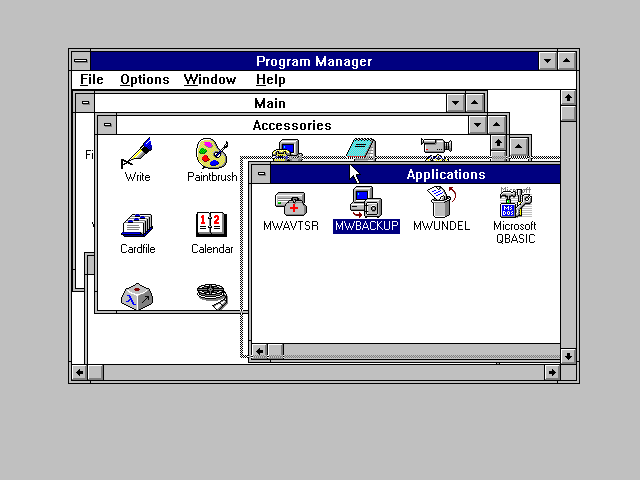
Microsoft has a habit of putting out silver followed by tarnish over the last few versions of their flagship product.
Windows XP - Silver
Windows Vista - Tarnish
Windows 7 - Silver
Windows 8 - Tarnish.
I can hope Windows 9 will address these shortcomings.
This really is a revolutionary release. Windows 8 opens a whole new world for the operating system. It does bring the whole Surface touch screen tablet world to the market. It is also a furious game of catch up that they're playing against the iPad/iPhone on iOS and all the Android tablets.
With every revolution there will be upset and a little blood spilled.
In my case, I will be returning to Windows 7 this weekend. It just gets in my way every time I use the new Start screen. Maybe I am missing the point. I do know that when people ask me for training on Windows 8 in the weeks after the Xmas rush, I'll be charging for support.
It just feels "Half Baked", not "an A Effort by an A Student". That's unfortunate since no matter what, Businesses will be using this. They'll hate it, and it will be another episode of people holding onto the old operating systems as long as possible or migrating to something else like iPads where possible. Just remember XP and how long it held on.
I found myself turning back the clock to Windows 3.1 in order to get around the heavy handed "The Desktop is Dead" Start screen. I didn't want to use Apps that went full screen in a nausea inducing flip to life. I won't even get into the god-awful color scheme that makes it more difficult to find windows start and end, or those hideous icons.
So instead of banging on, I'll offer a helpful hint.
Other than just trashing it all and going back to Windows 7 by whatever route you can come up with, here is how I got it to behave without buying any software.
This picture below shows my desktop on its last day.

If you look at the bottom of the task bar, you will see a menu. I got that by right clicking on the mouse near the clock on the task bar.
Select "Toolbars" from the pop up
Select "Desktop" from the fly out menu.
Just like you see above.
What that gives you now is a little "Start Menu" way of looking at what is sitting on your desktop. I have been doing this for years now, since Windows XP. Much easier than going through dozens of stray icons.
You can stop there and use that menu like your Windows 7 and earlier Start Button.
I took it one step further.
Finding an open spot on the desktop, I right clicked.
Sliding the mouse over "New" I selected "Folder" from the flyout.
I named the folder "Program Manager" for nostalgia's sake but you could call it anything you like.
Now, drag all those loose icons on the desktop that you get when you install a program to it into that folder. You can use it just like you would the old school Windows 3.1 Program Manager or just use it as a folder on the fly out when you click on the Desktop menu on your task bar.
That was how I got around the maddening loss of knowing where everything was in the Start Screen. There was way too much scrolling for my tastes after the conciseness of the Windows 7 and before Start Menu.
Does it seem drastic? Maybe.
It will take a lot of work for you to maintain this.
You will probably create sub folders within your Program Manager to regain some semblance of order. One for links, another for Programs, a third perhaps for files that you need every day.
It just seemed easier to do things this way.
This weekend I banish Windows 8 for now. They may make life easier in the future when Windows 8's first service pack comes out. For me it has become a major headache and a major distraction. I'm getting rid of it because frankly I have work to do and it was holding me back. Microsoft trained us to work one way, now it wants us to change. I took the bullet early, and thankfully I only got grazed.
When Grandma opens up the new and shiny computer over the holidays, she'll probably need a lot of help. Good luck. You probably should have gotten her an iPad. After all, it "Just Works".
Thursday, October 4, 2012
Windows 8 Start Screen - Something's Missing Here

Never mind that in the picture the text is a bit too small to read. My idea actually, you can't blame Microsoft for that.
I'm doing that for a point.
You see, we have been trained to look at that skyscraper of program names that are groups of icons and more names to find our programs. If you had someone show you how, you even know that you can pin the ones you like the most to the top of your Start menu. That has been true at least since Windows XP, and I only personally started using the Pin To Task Bar or Pin To Start Menu a couple years ago when I got my Windows 7 laptop.
It made it quite a lot easier.
With Windows 8 the rules all changed. You now have a screen. When you hit your windows key, the monitor shifts to this screen from your desktop or your app. It does so a bit dizzily as if you are physically turning the monitor to look at the back of it where, surprise! there is your start screen.
Eye candy aside, the presentation is again geared for a tablet. What you are seeing is my very own start screen. Big chocolate colored rectangles represent those programs I installed, the other pastel colored rectangles are those that Microsoft put there. Color is a visual clue.
The rectangle for the desktop is a representation of the background of your desktop all shrunk down. Makes some sense to do it that way because most of us who will take the time to add your own picture to the desktop will want to see it some time, even if it's only there since we've got too much work on top.
But that raises the question, where is all my "stuff"?
That's just it, the Start screen only has those icons that you put there when you added the program. Not every program will add an icon to it, so you'll be lost.
What you have to do is search for your programs.
First you scroll to the right. Since everything is so blasted big, you are scrolling... and scrolling... and scrolling until you hit the end of the screen. You might be confused because the program may not in fact be there.
Now what to do? Yes, you have to search for it.
But windows doesn't make it readily apparent how you do it... the combination Win plus the Q key will work and has worked for a couple of versions back. With all this nonsensical gigantic icon crap going on, there really should be an icon there with a magnifying glass saying "Find my Stuff".
Ok, so that not withstanding, here is what you get in Windows 8 when you do the search by hitting Win + Q:

Better get used to seeing this screen. While most folks use only a few programs in the course of a day, this is geared to your using "Apps". When you find the app you want, right click on it and add it to your start screen to save your sanity by clicking on the "Pin to Start" button.
By going through all these steps that should have been done for you, you'll have the ability to use the app. It may be in the desktop which is not where Microsoft wants you to run your programs, er, sorry... Apps now. No, that's a very different space.
You see Desktop is now intended to be the place where only the grumpy old programs run that don't look like your New And Shiny Apps. They don't really want you in the Desktop any more. Microsoft are betting the bank on converting your desktop to a big old Tablet computer.
The biggest problem I have with Apps are that they are full screen. Just like your Android Tablet or iPad. Great. That will work for some folks, but if you use a computer professionally, that gets old very fast. Sure the Apps are intended to give you the same functionality that a windowed app would, but these new things take up the entire screen.
That works great if you're using a Surface Tablet. That works terribly if you are on a laptop.
Think about how you actually WORK on a PC. We're not talking about playing a game like Solitaire. In fact, Solitaire was not installed on my Windows 8 install, I would have to add it at their App Store. Just so Microsoft would be watching over you when you get your new apps and know what you are doing.... just like Google and Apple do every time you run your app there.
I don't really like that, it's decidedly creepy. I REALLY don't like that on the desktop.
So now you sit down and find your copy of Microsoft Word and Excel, and normally I start three Excel windows, one Word window, and Firefox every time I start the computer. Since the new idea is to go full screen, what do you do if you want to refer between two of those windows? Better get used to full screen app flipping and being much less effective at your job because now Word and Excel will be (eventually) full screen apps.
Despite the fact that the latest version of Microsoft Office doesn't really work well with being an App.
You get a lot of visual clues if you run a windowed operating system in a windowed mode. Some folks will use their browser full screen, and if that is their choice, my recommendation is to be happy with Windows 8 or a Surface tablet. Everything will look familiar and fairly new.
If you find this app flipping confusing and wonder why you can't keep a calculator app on your desktop visible when you're trying to get back to Word... you will find yourself frustrated beyond words with Windows 8.
Frankly they broke the way you will work.
You see, while the Desktop is in its own little penalty box of Desktop Land, all the Apps are in their own place of App Land. You'll have to find the little hot corner (Upper Left) and hope you have the mouse cursor jammed up there long enough to see the little icon fly out so you can pick your app.
All of this is very clumsy on the desktop where you're used to having precise control over your mouse and selecting things as small as an individual dot. It has to be because on a tablet there is no mouse, there is only your finger. Some of us have very large fingers indeed, and Microsoft has done a fairly good job of accommodating that, but if you are not using that touch screen you'll find yourself scratching your head and thinking what were they drinking or smoking that day when they decided to go with this way of doing things.
In my case, I'm looking forward to my next weekend project - getting rid of Windows 8. It's terrible. At least Windows Vista was useable!
Subscribe to:
Posts (Atom)